

Dear [memb_contact fields=FirstName],
The Alpha Fibonacci Total Trading System Software identifies potential Alpha Fibonacci trading opportunities and delivers that information straight to the chart.
If you purchased any of the Alpha Fibonacci Total Trading System Software, please follow these steps:
STEP 1: Install the latest version of NinjaTrader 8. It should be loaded and working properly with a data connection prior to installing these tools. Obtain the NinjaTrader Platform.
STEP 2: Submit your Machine ID via the form below. It is REQUIRED to activate the Alpha Fibonacci Total Trading System Software.
STEP 3: Download the Alpha Fibonacci Profit Runner Software and install it in your Ninja 8 environment.
The trader will be alerted to the pattern by the scanner or receive a user defined alert by phone or email. It is essential to ensure that all Alpha Fibonacci Mastery Education Rules are met before placing any trade.
PLEASE NOTE: Your PC must meet the minimum requirements listed below to run NinjaTrader 8.
Upgrade from Existing Installation:
To upgrade the client needs to do the following:
- Remove AFSTotal from all charts.
- Close any Scanner windows.
- From Control Center go to Tools, Remove NinjaScript Assembly. Locate item that begins “AFSTotal” and select, hit Ok.
- Restart NinjaTrader
- Download new version from this page
- From Control Center go to Tools, Import NinjaScript Add-On. Locate AFSTotal zip file and select, hit Ok. If it asks to replace templates hit Ok.
You can now add AFSTotal to a chart and create new Market Analyzer windows and load scanner templates. Go to the next section below.
New Installation:
To install AFS Total Software, from the NinjaTrader Control Center go to Tools, Import, NinjaScript Add-On. Locate and select the downloaded zip file. Once installed into NinjaTrader you should be able to add the chart tool to your charts. You should be able see AFSTotal in your indicator list.
To start a Scanner, open a new NinjaTrader Market Analyzer window in NinjaTrader (Control Center, New, Market Analyzer). Then in the window, right-click then Templates, Load and you should see the 3 templates. Select one of them and load the template. Next add an instrument to monitor. Right-click, Add Instrument. Scanning process should begin on each column with signals such as “Long” or “Short”. Most of the time “* * *” will appear indicating a neutral state.
Don’t hesitate to contact us with questions or comments via the request form. We are available to meet online via TeamViewer or Skype to review basic installation and configuration if you like to make an appointment.
You always can reach out directly, info@fibinstitute.com or +1.925.257.4298

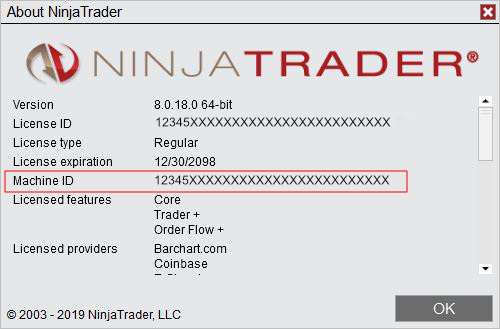
PLEASE SUBMIT YOUR MACHINE ID FOR LICENSING PURPOSES.
On The NinjaTrader 8 Control Center Select the Help Menu.
From the Drop Down Menu select About…
Your Machine ID will be displayed in the Pop Up Window.
Copy & Paste the 32 Characters Machine Id into the Form.
ALPHA FIBONACCI SHORT TERM SCANNER WITH TRADE RECOGNITION TOOL
The Alpha Fibonacci Scanner monitors in real time multiple instruments across multiple short term range and minute charts. This Day Trading Scanner alerts the trader to potential Alpha Fibonacci Trades. This implementation enables the trader to watch potentially multiple instrument/chart combinations at one time. The trader must confirm if this is a valid trade prior to placing the trade.
The Alpha Fibonacci Day Trading Scanner is optimized for short term day trading scans of Futures from 5 min. to any time frame as well as Range Charts. The Alpha Fibonacci Scanner has the capability of sending alerts to your phone or email.
The Alpha Fibonacci Trade Recognition Tool identifies trading opportunities and displays trade parameters directly on the chart.
Once the Alpha Fibonacci Trade Recognition is identified the tool displays suggested Trade Entry, Stop Placement, and Fibonacci Targets. The trader must confirm if this is a valid trade prior to placing the trade.
The Trade Tool is fully customizable and has Trade Alert Functions, which can be configured for sound, email or phone messaging.
ALPHA FIBONACCI PIVOT FINDER TOOL
The Pivot Finder Tool is a dynamic tool that plots higher time frame (HTF) support and resistance pivots direct to the current Trading Chart. They form in real time throughout the trading day and when the HTF pivot is broken the line is automatically removed. HTF pivots are fully customizable to trader requirements and most commonly used to display Hourly, Daily and Weekly Pivots.
ALPHA FIBONACCI NO GAP RANGE BARS & RANGE BAR MARKER
The Alpha Fibonacci No Gap Range Bars are a type of price bar that only takes price movement into consideration. Time has no effect. Currently in NinjaTrader 8 Range bars have gaps. The Alpha Fibonacci No Gap Range Bars eliminate gaps thus providing smoother and more fluid bar charts. The Alpha Fibonacci Range Bar Marker tool works in conjunction with the Alpha Fibonacci No Gap Range Bars by displaying the projected highs and lows for the current forming bar.
MINIMUM SYSTEM REQUIREMENTS
NinjaTrader 8 Version 8.0.17.0 or later
Windows 10
Minimum PC Requirements
Your PC must meet the minimum requirements listed below to run NinjaTrader 8
- 1 gigahertz (GHz) or faster 32-bit or 64-bit processor
- 2 GB RAM
- Microsoft .NET Framework 4.5 (pre-installed on most PC’s and can be downloaded here: Microsoft .NET Framework)
- Screen resolution of 1024 x 768
- DirectX10 compatible graphics card highly recommended
.
Recommended PC Specifications
NinjaTrader 8 was designed to take full advantage of modern PC architecture. To achieve the highest possible level of performance, NinjaTrader 8 will utilize all available CPU cores and additional memory resources. Depending on your actual usage with NinjaTrader, you may need more or less resources than the average user. Additional memory will be of direct benefit when running strategy optimizations, and the amount of additional memory needed is proportional to the number of CPU cores available.
- 2 (GHz) or faster quad core 64-bit processor
- 8 GB RAM
- DirectX 10 compatible graphics card
- SSD Hard Drive
.
Other Comments:
- CPU / Processor: You want an efficient processor, the faster the better.
- Hard Drives: SSDs are faster and less fragile than Hard Disk Drives (HDDs). A trading computer can benefit more from having a small, fast SSD with a second HDD for backups and storage.
- Memory: All applications benefit from more RAM and it is relatively inexpensive. 8 GB or more is recommended.
- Monitors: 2 monitors are recommended. If you are running a laptop you should consider adding a screen.
- Internet Speed: 20-30 Gigabits of download bandwidth should be sufficient. Again, faster is better.
- Windows 10 is strongly recommended, especially for the Scanners. Windows 7 will no longer be supported by Microsoft in 2020.
- Graphics Cards / Video: Expensive graphics cards capable of 3D rendering or shading aren’t necessarily needed for trading computers. What you want are cards that can provide for multiple monitors.